Monitoring of temperature, humidity, shock, light, and location
Automatic flight mode for air transport
Cloud access with LogTag Online
Compliance with international standards: FCC, CE, DO-160H, FDA 21 CFR Part 11
Temperature monitoring from -30 °C to +70 °C
Single-Us or Mulit-Use versions available
Seamless real-time data for shipments
With the LogTag LT5GEO, you always have a clear overview of your sensitive products from pickup to final delivery. This advanced data logger provides precise monitoring of location, humidity, shock, light, and temperature. Whether it’s pharmaceuticals, food, or technical equipment, the LT5GEO ensures you’re informed about all critical conditions of your shipment.
Instant Alerts and Notifications You receive immediate alerts for any deviations from preset parameters directly on your phone, via email, SMS, or WhatsApp. These rapid alerts allow you to take immediate action to protect your shipment. In addition, you’ll be automatically notified when your products reach their destination, helping you efficiently manage and optimize your logistics processes.
Reliable connectivity The LogTag LT5GEO uses GSM technology for global deployment and offers seamless integration with LogTag Online, where data is continuously uploaded and stored. By utilizing 4G/5G networks with 2G fallback, your device remains connected even in remote or hard-to-reach areas.
Advanced sensor technology This logger is equipped with five highly sensitive sensors that not only measure temperature and humidity but also record shocks, light exposure, and precise geographic location data. This comprehensive sensor technology ensures you get a complete picture of all environmental conditions your shipment is exposed to.
Automatic flight mode The LT5GEO automatically detects when it is on board an aircraft and switches to a secure flight mode that pauses transmission while continuing to record all data. After landing, the recorded data is uploaded immediately, ensuring no information is lost.
International Standards and Compliance This device complies with key international standards and guidelines such as FCC, CE, DO-160H, and FDA 21 CFR Part 11, underscoring its suitability for global use in regulated industries such as the pharmaceutical and food sectors.
Product Model
LT5GEO
Connectivity
LTE Cat M1/EGPRS
Temperature Sensor Measurement range
-30 °C to +70 °C (-22 °F to +158 °F)
Recorder Operating Temperature Range
-30 °C to +70 °C (-22 °F to +158 °F)
Storage Temperature Range
0 °C to +40 °C (-32 °F to +104 °F)
Humidity Measurement Range
0 %RH to 100 %RH (non-condensing), with limitations
Humidity Operating Range
0 %RH to 100 %RH (non-condensing), with limitations
Storage Humidity Range
5 to 95 %RH non-condensing
Rated Temperature Reading Accuracy
Better than ±0.45 °C (±0.8 °F) for +0 °C to +50 °C (+32 °F to +122 °F), typically ±0.3 °C (0.6 °F). Better than ±0.8 °C (±1.4 °F) for +50 °C to +70 °C (+122 °F to +158 °F), typically ±0.5 °C (0.9 °F). Better than ±0.95 °C (±1.7 °F) for -40 °C to +0 °C (-40 °F to +32 °F), typically ±0.6 °C (1.1 °F). Actual performance is typically much better than the rated values. Accuracy figures can be improved by recalibration
Rated Humidity Reading Accuracy
Better than ±3 %RH for 20 %RH to 80 %RH, typically ±2 %RH. Better than ±5 %RH for 0 %RH to 20 %RH, typically ±4 %RH. Better than ±5 %RH for 80 %RH to 100 %RH, typically ±4 %RH. Actual performance is typically much better than the rated values. Accuracy figures can be improved by recalibration
Light Sensor Range
0-120,000 lux (0-100%)
Shock Sensor Measuring Range
0-16 g
Shock Sensor Resolution
0.1 g 1 m/s^2
Shock Sensor Sampling Rate
25 Hz
Recording Capacity
16,320 total log memory
Transmission Interval
1-24 hours, depending on trip duration set through LogTag® Online Uploads immediately when alarm is triggered, regardless of transmission interval
Sampling Interval
10 minutes
Logging Start Options
Push button start, with configurable delay, from 1 minute to 72 hours
Environmental
IP61
Power source
Non Lithium Rechargeable Nickle Metal Hydride (NiMH)
Battery Life
90 days operation with normal use (30 minute logging, upload every 60 minutes)
Where can I get the certificates for the LT5GEO data logger and LogTag Online (LTO)? All certificates are available for download on our website: LogTag - Support and Downloads
When should I start the logger? First, fully charge the logger using a USB-C cable (until the green LED stays on), then configure it in LogTag Online and start it by pressing the Start button.
How long can the single-use logger remain in transit? The logger can remain in transit for 90 days under normal use (30-minute logging, upload every 60 minutes).
Can the data logger record measurements while charging? No! The data logger does not record data while charging.
Where is the best place to position the logger during transport? To ensure the best possible reception, we recommend placing the LT5GEO in an open area where it has a clear view of the sky, e.g., on the roof of a delivery vehicle and not inside a metal container. This setup increases the likelihood of a GPS connection, allowing the logger to capture more accurate location data throughout its journey. Make sure the data logger is not obscured by the cargo. If the light sensor is blocked, it cannot detect changes in light and will not trigger corresponding alarms.
Can the data logger be used for location tracking? No, the data logger was manufactured exclusively for transport.
In which countries can the logger be used? Thanks to the SIM card, the data logger can be used worldwide. The cost of the SIM card is included in the price.
Are there any restrictions on LogTag Online regarding the number of files, transfers, alarms, etc.? LogTag Online only has restrictions for free accounts. You can find detailed information under the Data Plans tab on our LogTag Online software page
Why doesn’t my data logger receive or transmit GPS data inside the steel container? Due to the strong shielding provided by the metal housing, GPS reception and data transmission are not possible. The logger continues to reliably record the measured values and stores them internally. As soon as the device is back in the open air and can establish a connection, the cached GPS and sensor data are automatically transmitted to the cloud. Please note: While the logger is inside the container, no real-time transmissions or alarm notifications are possible because there is no wireless connection. This information is only synchronized later, once network reception is restored.
Can you create a location for the LT5GEO? No! Currently, a location (as a fixed location) cannot display much of the information sent by the LT5GEO, such as mapping data, light levels, and shock events. Additionally, the LT5GEO can only record and transmit while running on battery power and must be recharged regularly, so it cannot record information (continuous monitoring of a fixed location). Therefore, there is no support for the Transit Logger when monitoring fixed locations.
What happens to the cloud license if a logger malfunctions in the second year after the license has already been paid for? Our service will determine whether this is a warranty case. If LogTag Online (LTO) is not being used, there are no costs, so the license can be suspended or extended until the logger is replaced.
What calibrations are possible? Light and shock are calibrated once at the factory; only temperature and humidity can be calibrated subsequently.
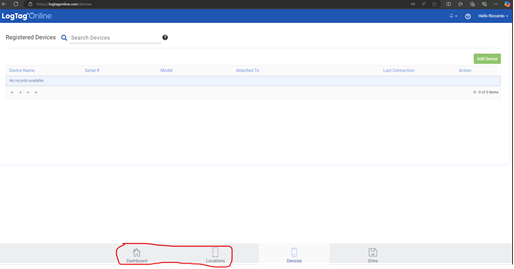
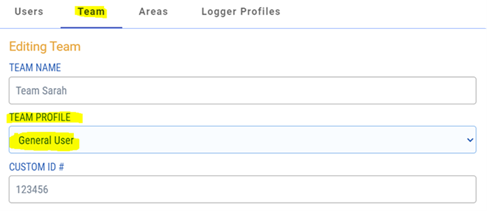
Why aren’t my shipments showing up in LogTag Online?
Procedure:
Manage Team (top right in LogTag Online)
Select Team
Set the following values
How is the data logger's alarm profile configured?
Primary and secondary coordinators are immediately notified via email and SMS. If no confirmation is received within 20 minutes, the coordinators are notified again via email and SMS. After another 20 minutes, coordinators and the emergency contact are notified via email. After another 20 minutes, coordinators and the emergency contact are notified via SMS. The intervals between subsequent notifications double until a maximum of 8 hours is reached. After that, all contacts (coordinators + emergency contact) are notified via email and SMS at staggered intervals of 40, 80, and 120 minutes until the event is confirmed or a total of 22 notifications have been sent.


 Bulgarian
 German
 Spanish
 French
 Greek
Greek Italian
 Romanian
 Turkish