Where can I find the certificates for the LT5GEO data logger and LogTag Online (LTO)?
All certificates are available for download on our website: LogTag - Support and Downloads
When should the logger be started?
The logger is first fully charged using a USB-C cable (until the green LED is constantly lit) and then configured in LogTag Online and started via the start button.
How long can the single-use logger be in transit?
The logger can be in transit for 90 days under normal use (30 minutes of logging, upload every 60 minutes).
Can the data logger store readings while charging?
No! The data logger does not record any data during the charging process.
Where is the best place to put the logger during transport?
To ensure the best possible reception, we recommend placing the LT5GEO in an open location with a clear view of the sky, such as on the roof of a shipment, rather than inside a metal container. This placement makes it more likely to get a GPS connection, so the logger can collect more accurate location data throughout the trip. Make sure that the data logger is not covered by the goods. If the light sensor is blocked, it cannot detect changes in light and cannot register corresponding alarms.
Can the data logger be used for location monitoring?
No, the data logger was produced exclusively for transport.
In which countries can the logger be used?
The data logger can be used worldwide thanks to the SIM card it uses. The cost of the SIM card is inclusive in the price.
Are there any limitations with LogTag Online regarding the number of files, transfers, alerts, etc.?
LogTag Online only has limitations for free accounts. Detailed information can be found under the Data Plans tab on our LogTag Online software page.
Why isn't my data logger receiving or transmitting GPS data inside the steel container?
Due to the strong shielding provided by the metal housing, GPS reception and data transmission are not possible. The logger continues to reliably record the measurements and store them internally. As soon as the device is back outdoors and can establish a connection, the temporarily stored GPS and sensor data will be automatically transferred to the cloud.
Please note: While the logger is inside the container, real-time transmissions and alarm notifications are not possible because there is no radio connection. This information will only be synchronized later once network coverage is restored.
Can a location be created for the LT5GEO?
No! Currently, a location (as a fixed location) cannot display much of the information transmitted by the LT5GEO, such as mapping information, light levels, and shock events.
In addition, the LT5GEO can only record and transmit while on battery power and requires regular recharging, preventing it from recording information continuously (i.e., monitoring a fixed location).
Therefore, the transit logger is not supported for monitoring fixed locations.
What happens to the cloud license if a logger breaks down in the second year after the license has already been paid for?
Our service will check whether this is a warranty case. If LogTag Online (LTO) is not used, there are no costs, so the license can be suspended or extended until the logger is replaced.
What calibrations are possible?
Light and shock are calibrated once at the factory; only temperature and humidity can be calibrated subsequently.
Why are my shipments not displayed in LogTag Online?
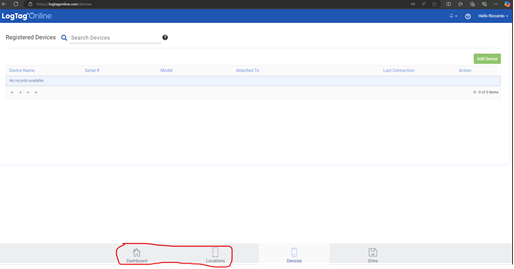
Procedure:
How is the alarm profile of the data logger structured?
Primary and secondary coordinators are immediately notified by email and text message. If there is no confirmation after 20 minutes, the coordinators are notified again by email and text message. After another 20 minutes, coordinators and emergency contacts are notified by email.
After another 20 minutes, coordinators and emergency contacts are notified by SMS. Delays in further notifications double each time until a maximum of 8 hours is reached.
After that, all contacts (coordinators + emergency contact) will be notified at staggered intervals of 40, 80, and 120 minutes via email and SMS until the event is confirmed or a total of 22 notifications have been sent.


 Bulgarian
 German
 Spanish
 French
 Greek
Greek Italian
 Romanian
 Turkish